
AI-powered school management software, built around your curriculum
Admissions, the roll, exams, report cards and messages to families in one system. Choose your curriculum and the classes, terms, subjects and grading scale are already set up, in its own words. AI proposes the timetable, drafts the lesson and writes the first draft of the message home. A person decides every time.
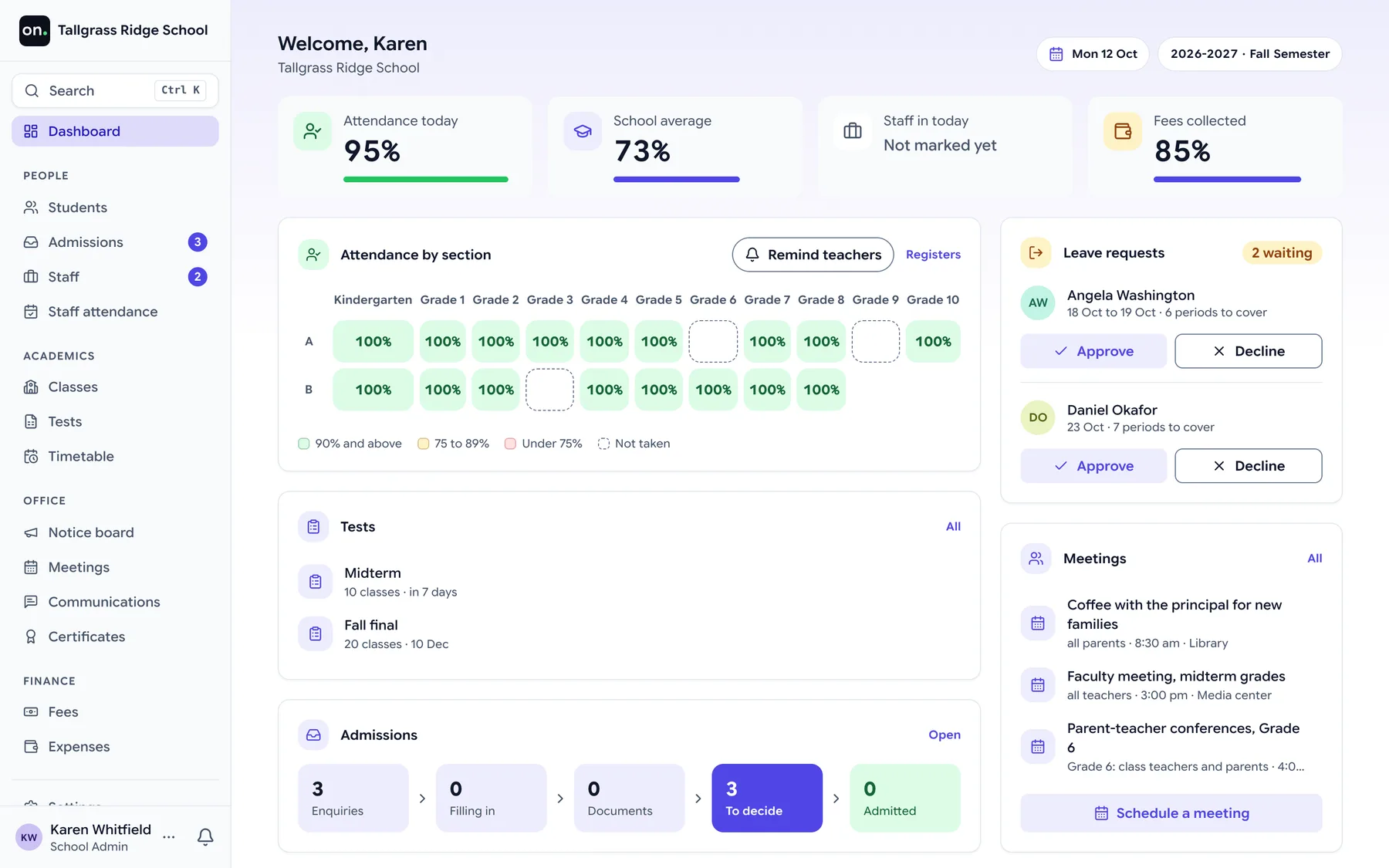
- 200 students free
- 89 curricula
- 21 modules
- HTTPS on every connection
The problem
A school office runs on registers, retyping and a group chat
Not because anyone chose it. Because every tool so far has made the office fit the tool.
01
The same child, written down four times
In the admission register, the class register, the fee book and the report card. When a family moves house, somebody finds all four.
02
Report cards typed twice
Marks go into a spreadsheet, then into a template, then onto paper. Three copies, and the one the parent holds is the one with the mistake.
03
The circular nobody can find
Sent to the class group chat at 4 pm, buried by 4:15. The office cannot tell who read it, and the parent who missed it is at the gate the next morning.
Onflows is one record of the school. Enter a thing once, and every other screen is correct because it reads the same record.
Before anything else
Your records, handled the way a school would want
You are handing over children's data. These are properties of how Onflows is built, enforced on every request, not policies in a document.
Encrypted on every connection
Every page, login and upload travels over HTTPS. Nothing between a parent's phone and your records is sent in the clear.
Separated at the database
Every record carries your school's identifier, and the database refuses a read that crosses schools. A policy on the data, not a filter in our code.
Roles checked on every action
Permissions are checked when the action runs, not when the menu is drawn. A teacher cannot reach another class's marks by guessing a URL.
Nothing is hard-deleted
A wrong receipt is corrected by a reversal that stays on the record. A closed year is archived. An append-only trail records who changed what.
Your data stays yours
Export everything your school put in, at any time. If you leave, we delete it on request and confirm when it is done.
Delivery you can see
Every circular and result sent to a parent records whether the email arrived or bounced, rather than assuming it did.
What we do with the data, in full, is in the privacy policy.
How it works
From a spreadsheet to a running school, in an afternoon
There is no implementation project. You do it yourself, and the dry run tells you what to fix before anything is written.
Step 1
Choose your curriculum
US K-12, IB, Cambridge, the English National Curriculum or 85 others. The class ladder, terms, subjects and grading scale arrive configured, in its own words.
Three curricula and what each one calls the same school year Curriculum Name for this year US K-12 Grade 7 English National Curriculum Year 8 CBSE Class 7 Step 2
Upload the spreadsheet you already keep
The importer maps your columns to ours, reads nine date formats, and shows every problem in a dry run before a single record is written.
Sample dry run
- 198 rows ready to import
- 3 duplicate admission numbers
- 1 date it could not read
Nothing is written until you accept this report.
Step 3
Open your school's address
Your own address is live with your name, logo and colours. Staff sign in, parents get their own login, and the day starts.
yourschool.onflows.app
Modules
Everything a school runs on, in one place
Not a suite of products sold together. One system, where recording something once is what makes every other screen correct.
Students and admissions
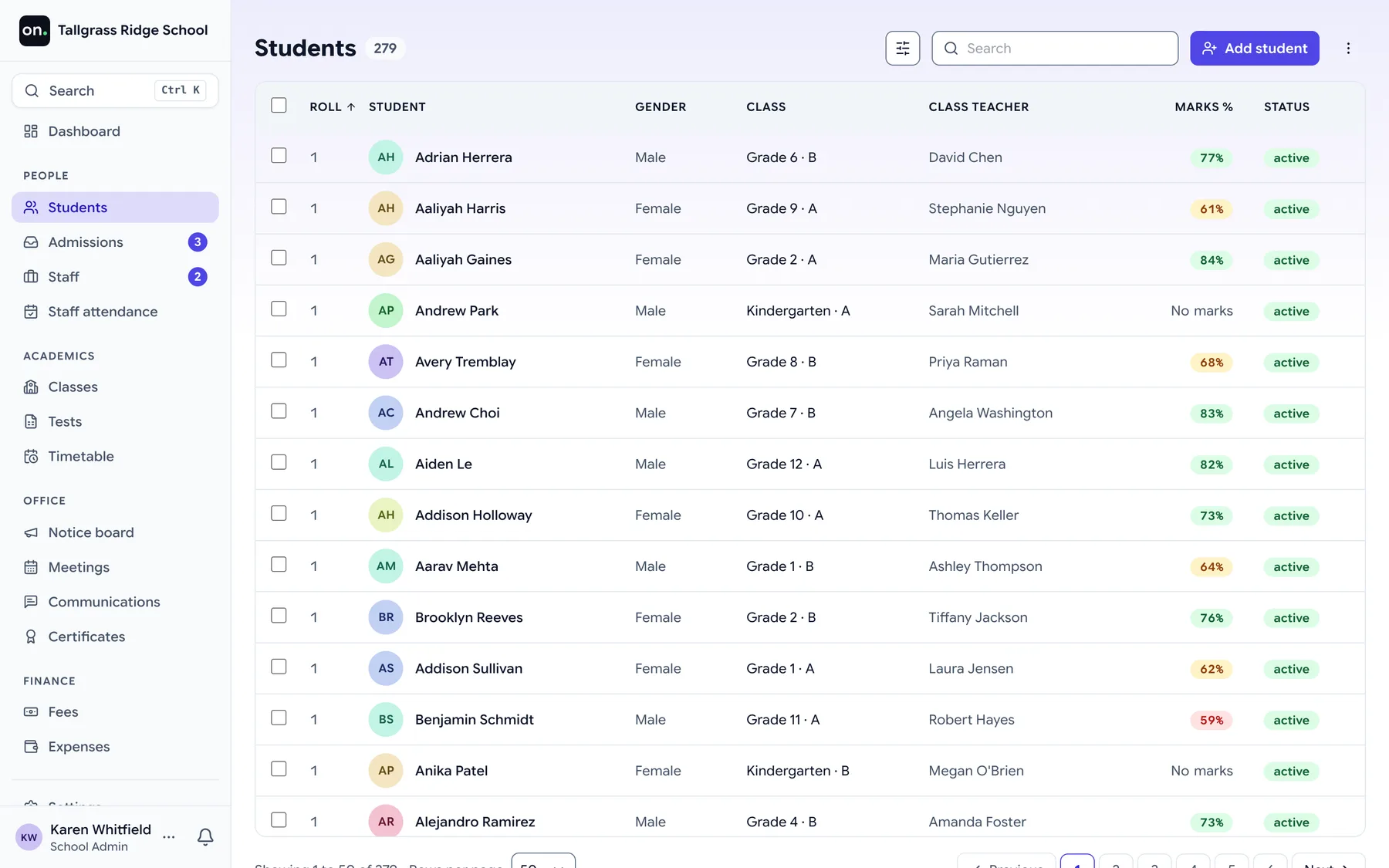
From the first enquiry to a student on the roll, one record the whole way.
Students and enrolment. The roll, admissions history, guardians and the student profile.
Admissions. The intake funnel, including a public application page for parents.
Bulk student import. Load an existing roll from a CSV with a dry run before anything is written.
Every school day
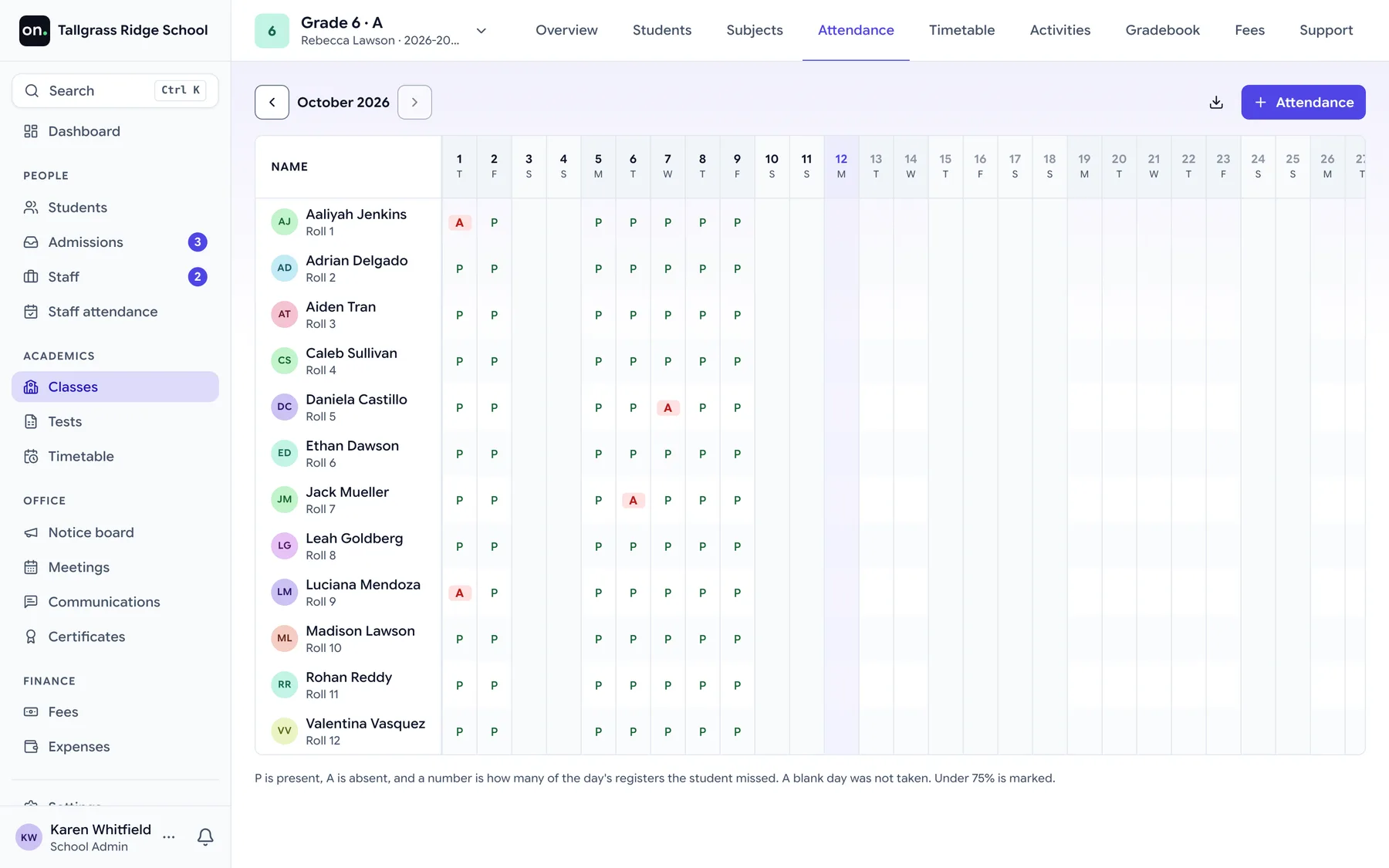
The notice board, meetings, staff leave and help beside every screen. Attendance, the timetable and Ask on Pro.
Notice board. Circulars to the school or to a class, with read receipts.
Staff leave. Leave requests and approvals for employees.
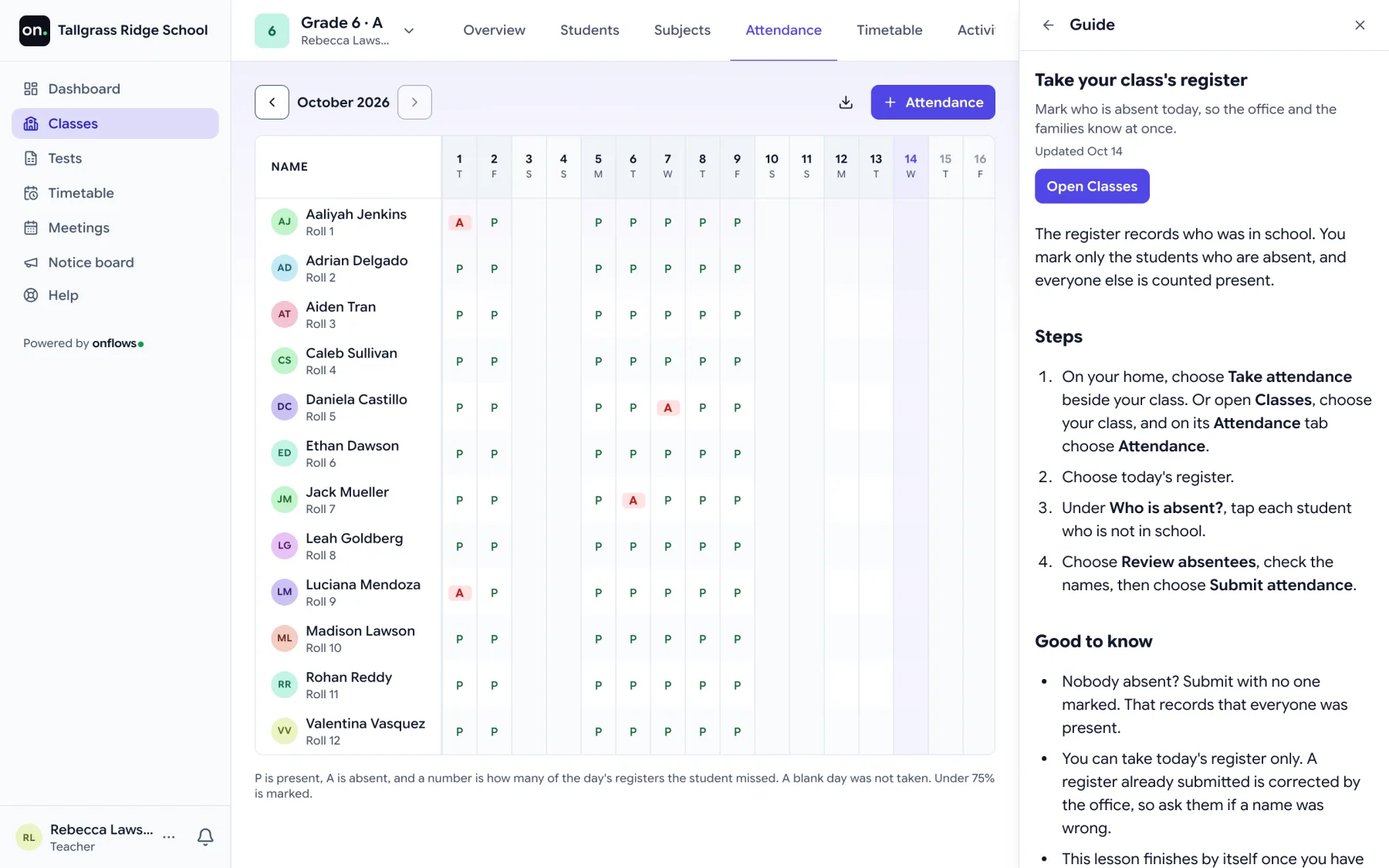
Attendance. Absentees per day, half day or period, taken by the teacher, corrected by the office, told to the family. Pro
Timetable. The week for every class, laid out by AI from your rules or by hand, with exams and meetings drawn over it. Pro
Help and tickets. Ask us, tickets with one owner, the class Support tab, and onflows support for technical issues. Pro
AI Help assistant. Ask us answers families and staff from their own records, and passes what it cannot answer to the right person as a ticket. Pro
Teaching and results
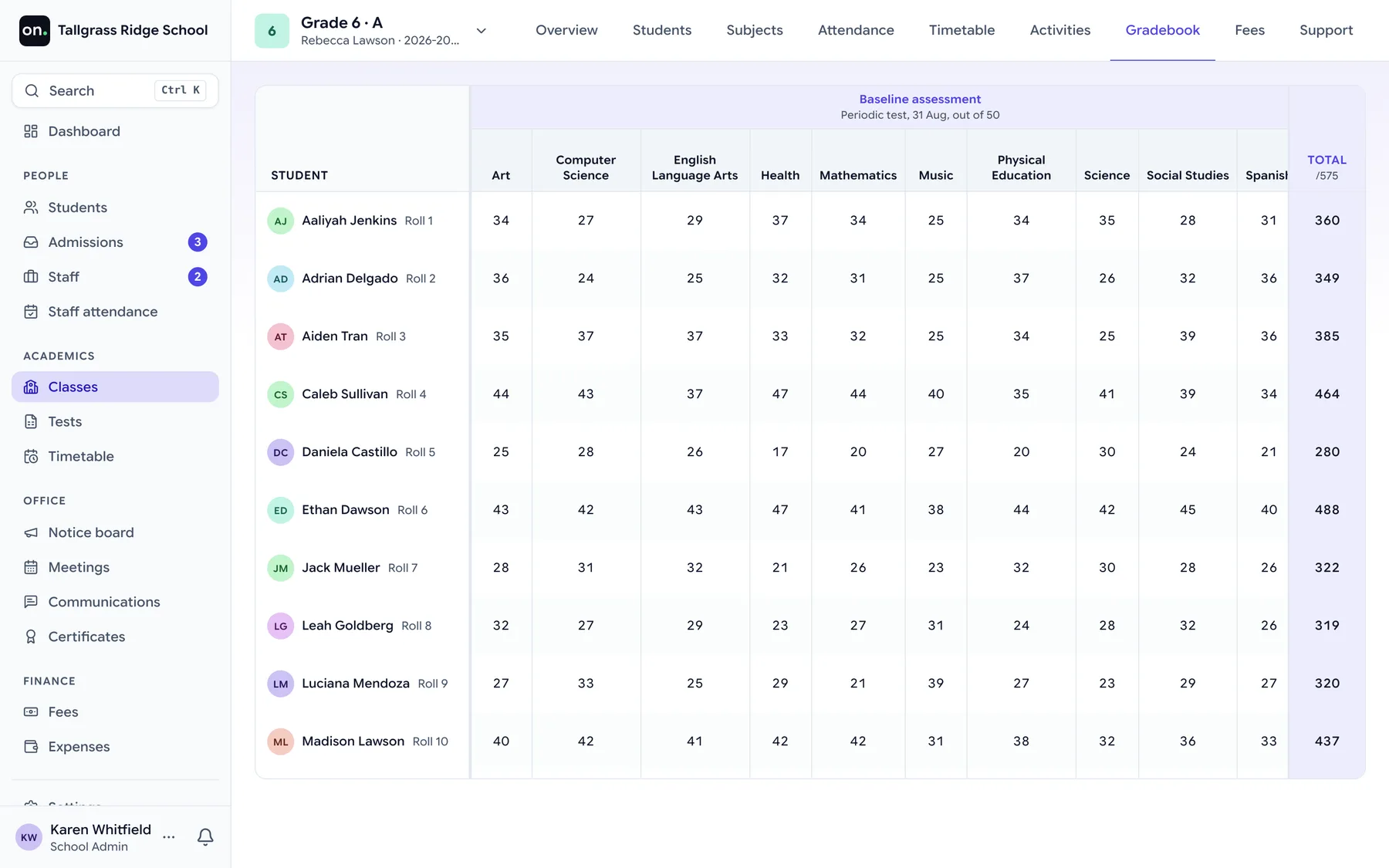
Enter marks once. The gradebook, the progress card and the parent's screen are the same numbers.
Tests and exams. Tests per class and subject, marks entry, question papers, re-examinations and published results. Pro
Gradebook and progress cards. Per-term academic truth, finalized and reproducible.
Subjects and workspaces. The subject catalog, yearly offerings, syllabus and materials.
Course content. Modules, lesson items, embedded video and rubric-graded submissions.
AI. A week's timetable proposed from your rules, checked by a verifier that does not guess, and applied only when you say so. Pro
Money, records and proof
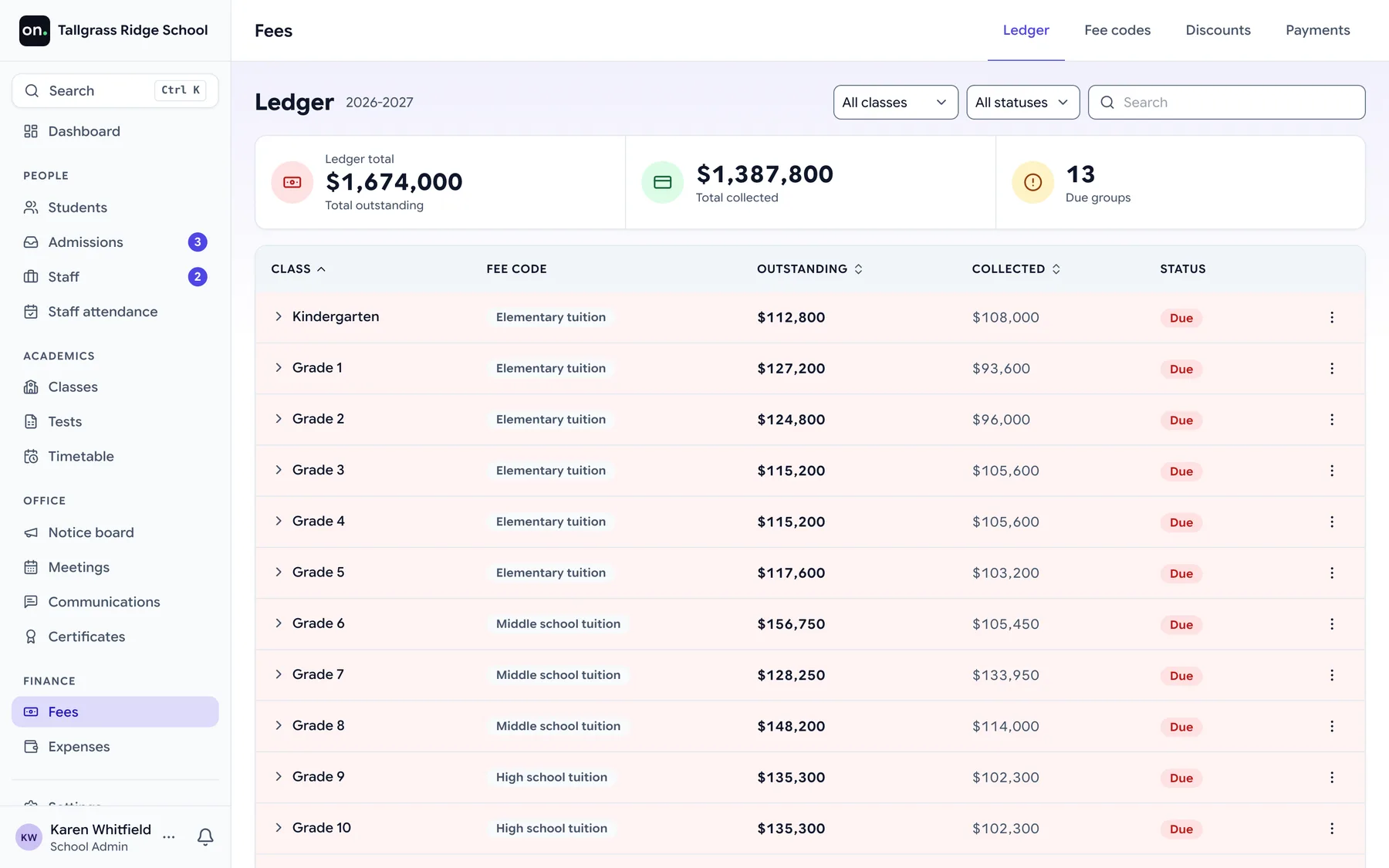
Fees, messages to families, documents and expenses, with a trail of who changed what.
Certificates. Serial-numbered bonafide, transfer and conduct certificates.
Document vault. Versioned student and school documents, never hard-deleted.
Multi-year archives. Closed years stay readable forever, with promotion and the lifelong timeline.
Audit trail and delivery tracking. Who did what and when, plus email delivery and bounce visibility.
Expenses. Record what the school spends by category, with receipts and a monthly picture.
Fees. Fee codes and instalments per class, discounts, what each student owes, and receipts. Pro
Messages to families. Email, SMS and WhatsApp messages to chosen families, with the school's own templates.
Who it is for
Six people, one record, each with their own way in
Each person sees what their job needs, and nothing beyond it. Parents and teachers mostly use it on a phone, so every screen was laid out for a phone first.
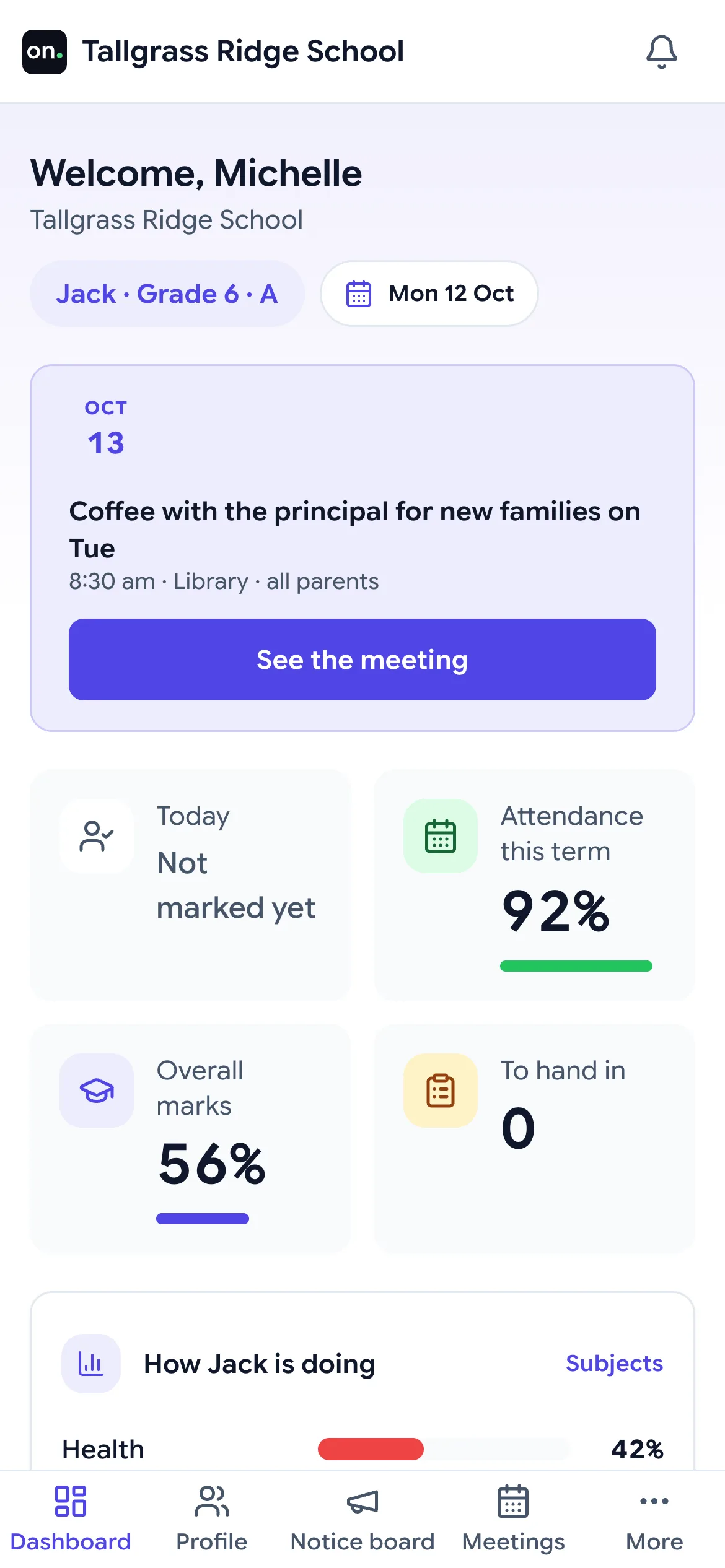
Runs in the browser on any phone and installs to the home screen. Nothing to fetch from an app store, nothing to update.
School admin
The office, without the registers.
- Admissions and student records
- Messages to families, drafted by AI
- The timetable, on Pro
Principal
The school, without asking for a report.
- Attendance across every class, on Pro
- Leave decided from the home page
- An append-only trail of who changed what
Teachers
Your class, on your phone, in your period.
- Attendance for your period, on Pro
- A first draft of every lesson, from AI
- Marks entered once; reports follow
Parents
Answers without a call to the office.
- Results and notices, and attendance on Pro
- Ask the school, and see who owns the answer
- One login per family, however many children
Front desk
The questions that arrive at the counter.
- One search box for student, guardian or staff
- Enquiry to application on the spot
- Guardian details corrected while they wait
Accountant
The money, without the notebook.
- Every expense recorded, on every plan
- One receipt for every fee payment, on Pro
- Reversals and refunds kept on the record
AI that works beside your staff, not instead of them
Not a chatbot bolted on the side. Help sits beside every screen and answers from your school's own guides, and AI drafts the timetable, the lesson and the message home. It proposes, a person decides, and nothing it writes counts until someone says so.
Help beside every screen, answers on Pro, the guides on every plan
A help companion that sits beside the page you are on
- You ask where you are stuckOpen Help on any screen. It shows the guides for that screen, or you type a question in your own words.
- AI answers from your school's guidesOnly from the guides your role can read and, for a family, their own records. Every answer names its source.
- A person takes what it cannot answerOne click raises it with the school as a ticket with one owner, so nobody is left with a machine.
The timetable, on Pro
A week's timetable, proposed from your rules
- You write the rulesGames on Friday afternoon. The two maths teachers never clash. No period before the lab is free.
- AI proposes a weekEvery class laid out at once against those rules, the part that takes a person longest.
- A verifier checks, a person appliesA fixed check compares the proposal with your rules. The clashes it reports are real.
The lesson
A first draft of the period, for the teacher to make their own
- The teacher picks the periodThe subject, the class and the topic come from the syllabus already in the system.
- AI drafts the lessonAn approach, worked examples, what goes on the board, an activity, and the questions to ask.
- The teacher edits and keeps itThe draft is theirs to cut and change. Nothing reaches the class until they say so.
Messages to families
The first draft of the message home
- The office picks the situationA fee reminder, an absence, an event: the template and the families it goes to.
- AI writes or reworks the draftDrafts it from scratch, or shortens, rephrases and reorganises what the office wrote.
- A person reads it and sends itEvery send is recorded per family, with whether it arrived.
Everything above has shipped. More is being built, and it will appear here when a school can use it, not before.
How each job works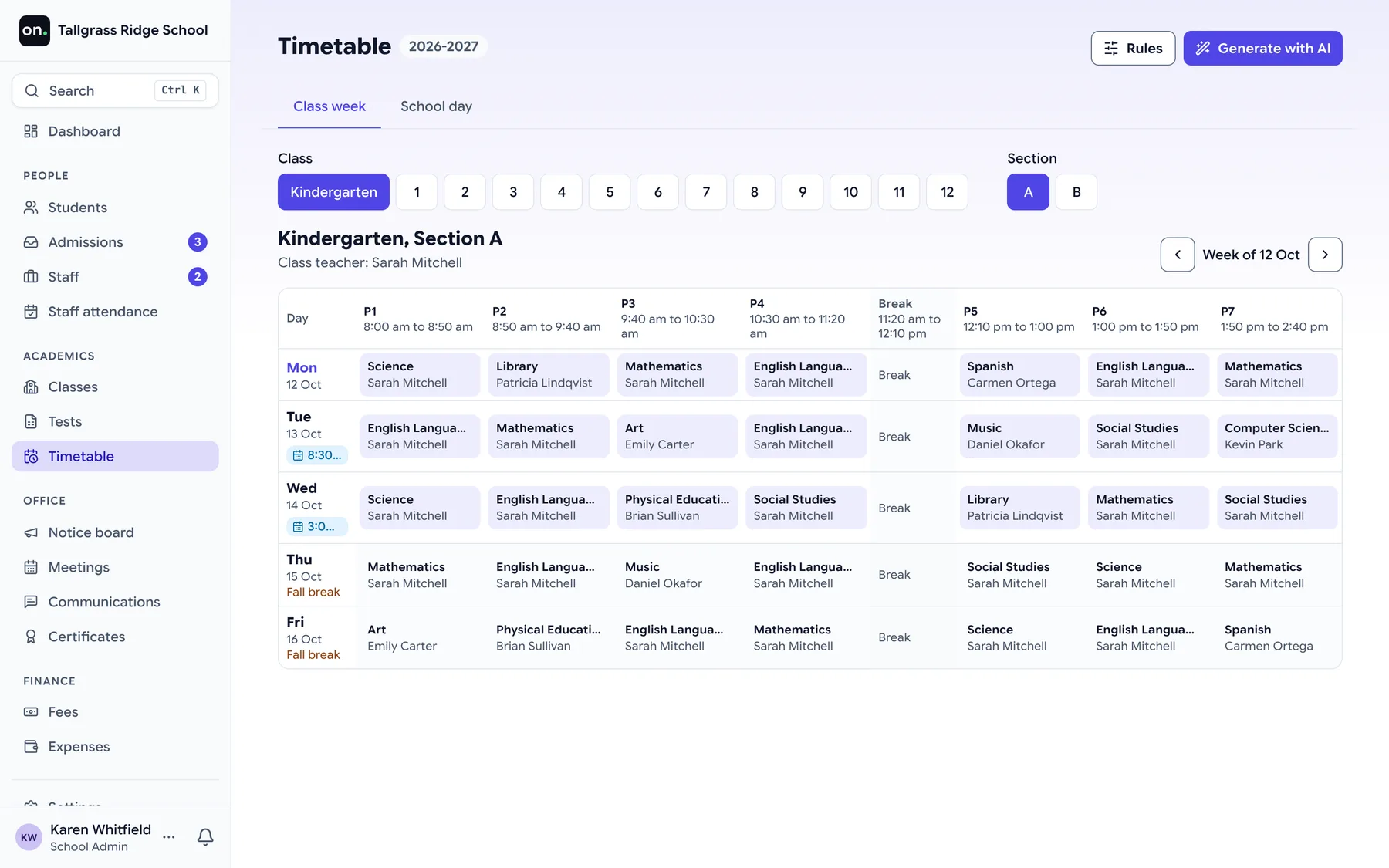
Your curriculum
89 curricula, already configured
Pick yours and the class ladder, terms, subjects and grading scale are set up in its own words. Class 7, Standard 7, Year 8 or Grade 7, whichever your curriculum says. If yours is not here, a curriculum is a data file, not a development project.
International
Offered in any country
Europe
12 countries, 34 curricula
Gulf
6 countries, 6 curricula
Americas
3 countries, 13 curricula
India
1 country, 32 curricula
Plans
A whole running school, free for 200 students
Community
Free, no time limit
- Admissions, the roll and guardians
- Marks, the gradebook and progress cards
- Subjects, syllabus and course content
- Messages to families, drafted by AI
- Help beside every screen, and a course for every role
- Documents, certificates and the audit trail
- Every expense recorded
Pro
Free for your first 6 months, then priced per student, never per teacher
- Everything on the free plan
- Attendance, per day, half day or period
- The timetable, by hand or proposed by AI
- Staff attendance, leave and cover
- Fee codes, instalments and receipts
- Tests and exams across classes
- Ask: AI answers in Help, and tickets with one owner
- No cap on the roll
Every new school starts on Pro, free, for its first 6 months. Community then runs a whole academic year, and the next one, with no time limit. There is no payment page: a person invoices you, which is why no button on this site says buy.
Still deciding
Questions schools ask us
How your school's records are kept apart from every other school's is the first of them. Read about security.
How long does it take to get started?
Minutes to have your school's address live, and an afternoon to be operational. You create the school, upload your existing roll as a spreadsheet, and check the dry-run report before anything is written. There is no implementation project and nothing to install.
Is our data separate from other schools?
Yes, and it is enforced by the database rather than by the application. Every record carries your school's identifier and the database itself refuses a read that crosses schools, so a mistake in our code cannot show your records to anyone else. We test that against a live database, not only in theory.
What does it cost, and is there really a free plan?
Community is free for up to 200 students, with no time limit, and every new school runs on Pro free for its first six months. Attendance, timetable, fees, tests and exams, AI, help and tickets and ai help assistant are on Pro; the roll, admissions, subjects, the gradebook, course content, messages to families and the notice board are all on the free plan. Pro is priced by the students you carry, never by teacher, and staff logins are unlimited on both. The full price list is on the pricing page.
What does the AI do, and what does it not do?
Four things today. Help sits beside every screen and answers questions from the school's own guides, handing what it cannot answer to a person. It proposes a week's timetable from your rules, and a verifier checks it before a person applies it. It drafts a lesson for a period, for the teacher to edit. It drafts, shortens and rephrases messages to families, for the office to send. It does not grade, it does not decide, and nothing it writes counts until a person says so.
Can parents use it without an app?
Yes. Onflows runs in a browser on any phone. Parents get their own login and see attendance, results, notices and messages for each of their children, with help for every screen they use. One login per family, however many children they have with the school.
What happens to last year's records?
They stay readable forever. A closed academic year is archived rather than deleted, students are promoted into the new year, and every student keeps a timeline that spans their whole time at the school. Nothing in Onflows is hard-deleted. A mistake is corrected by a record of the correction.
Create your school. It is free up to 200 students.
Choose your curriculum, upload the spreadsheet you already keep, and open your school's address the same afternoon.
- Your curriculum, already configured
- Live the same afternoon